

Pool Criteria
Each criterion is one condition a creator has to meet. The Add criteria menu groups the criteria, and each group has its own page with the options each criterion offers.
Before you start
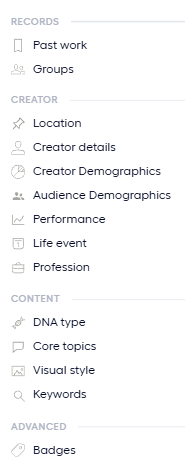
Open a pool in the editor and select Add criteria in the side panel. The following image shows the menu and its groups.
For how several values combine, see Build a Pool.
Criteria by group
The following cards link to the groups. Each card lists the criteria on its page.
Records Criteria
Past work and Groups. Find creators by what already happened on Fohr.
Creator Criteria
Location, Creator details, Creator Demographics, Audience Demographics, Performance, Life eventA milestone a creator announced publicly in a post, such as a new home or a graduation., and Profession.
Content Criteria
DNA typeA label Fohr assigns with AI to show how a creator presents themselves and engages with their audience., Core topicsThe topics Fohr assigns to a creator's profile with AI. Fohr does not rank them., Visual styleThe overall look and feel of a creator's content. Fohr assigns it with AI from their images and captions., and Keywords. Find creators by what they post and how it looks.
Advanced Criteria
BadgesA signal Fohr assigns to a creator, based on their activity or the views their content gets.. Find creators by signals Fohr defines.
Related articles
Pool
How Pool works, from pools and lanesOne complete definition of the creators you want. A creator must match every criterion in the lane. to the shortlistA creator you shortlist stays in the pool, even when they stop matching your criteria. and the override rules.
Build a Pool
Create a pool, add criteria, and choose how each criterion matches.
Expand a Pool with Lanes
Add, compare, and hide lanesOne complete definition of the creators you want. A creator must match every criterion in the lane. to widen a pool without losing the first definition.