

Records Criteria
Records criteria help you find creators based on their past work on Fohr. This group includes Past work and Groups, both available from the Add criteria menu.
Past work
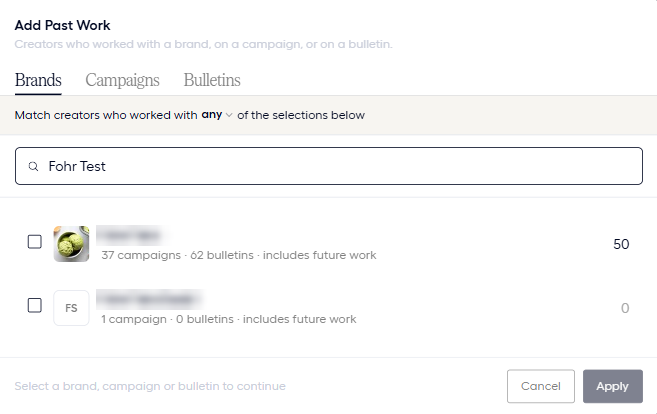
Use Past work to find creators based on their work with specific brands, campaigns, or bulletinsAn open opportunity a brand posts for creators to apply to..
The dialog has the tabs Brands, Campaigns, and Bulletins. Select the items you want to match, then choose how creators should match them:
- Any: Match creators who worked with at least one selection.
- All: Match creators who worked with every selection.
- None: Match creators who did not work with any of the selections.
What counts as past work
Each tab uses a different definition of past work.
| Tab | Matching criteria |
|---|---|
| Brands | Work with the selected brand. Choose Campaigns Only, Bulletins Only, or Everything to set the scope. |
| Campaigns | A place on the campaign with a Campaign status of Fully Contracted. |
| Bulletins | A role on the bulletinAn open opportunity a brand posts for creators to apply to.. Choose RecipientsThe target list of creators a bulletin reaches., Responders, or Approved Responders. |
Brand work scope
When you select a brand, the scope determines which types of work count:
- Everything: Includes the brand’s campaigns and bulletinsAn open opportunity a brand posts for creators to apply to..
- Campaigns Only: Includes campaigns with an Offer accepted status, as well as legacy campaigns. This is broader than the Campaigns tab, which requires Fully Contracted status.
- Bulletins Only: Includes the brand’s bulletinsAn open opportunity a brand posts for creators to apply to..
Brand counts and future work
Each brand row can show campaign and bulletinAn open opportunity a brand posts for creators to apply to. counts, along with an includes future work label.
- Campaign and bulletin counts: Show the total campaigns and bulletinsAn open opportunity a brand posts for creators to apply to. for the brand, whatever their status. They do not represent the creators who match.
- Includes future work: Means the criteria stay active and automatically include qualifying work added for the brand later. Upcoming campaigns do not count until someone is contracted.
Brand visibility
Fohr staff can see all brands in the list. Other users can see only the brands they belong to.
Groups
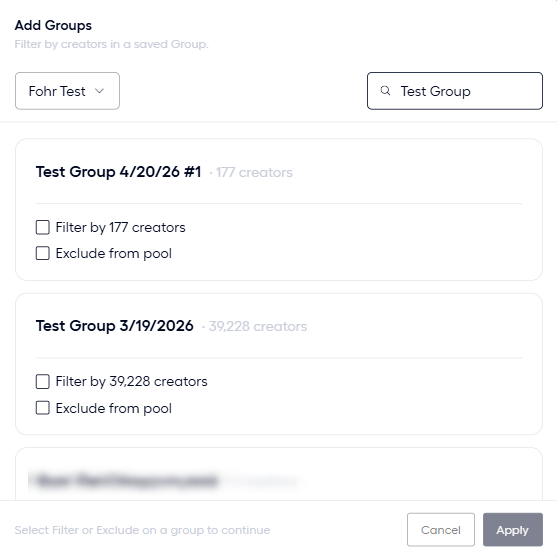
Use Groups to find creators based on their membership in a saved group.
Select a group, then choose how it affects your pool:
- Filter: Keep only creators who belong to the selected group.
- Exclude: Remove creators who belong to the selected group.
Related articles
Pool Criteria
The Add criteria menu and the groups of criteria.
Build a Pool
Create a pool, add criteria, and choose how each criterion matches.