

Pool
Pool is a shared workspace where you define the creators you want to find. Fohr checks your criteriaOne condition a creator has to meet, such as Location or Profession. and displays everyone who matches, with the best matches first. Each creator’s results show which criteriaOne condition a creator has to meet, such as Location or Profession. they matched.
Your team can open and work from the same saved pool.
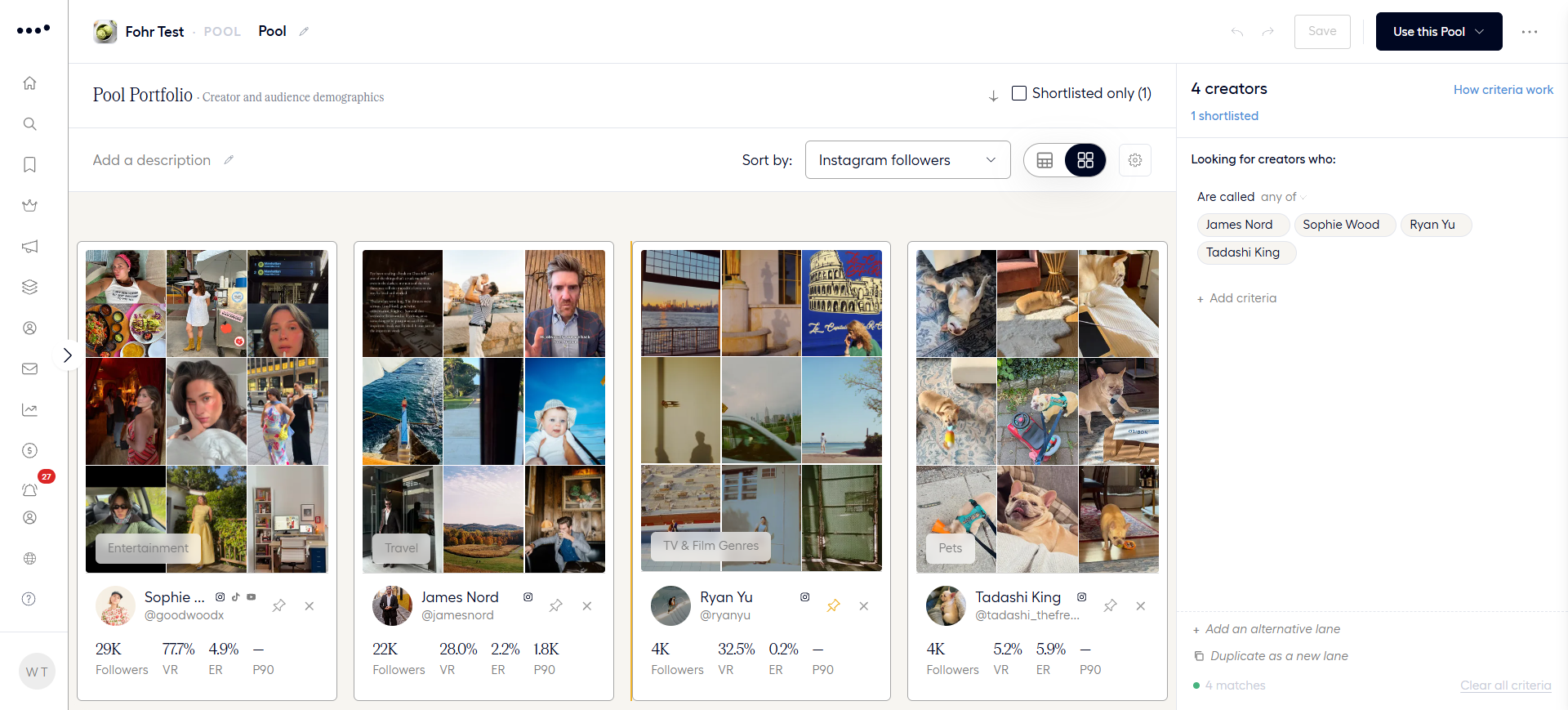
The following image shows the Pool screen, with a single criterionOne condition a creator has to meet, such as Location or Profession. and the creators who match it.
Pool, Search, Creator Review, and Groups
These tools help you find and manage creators, but each serves a different purpose.
| Tool | What it is | Use it when |
|---|---|---|
| Search | A one-time lookup. Search for creators, review the results, and move on. | You need an answer right away. |
| Pool | A saved, shareable workspace. Creators join when they match your criteria and leave when they no longer match. | You need to screen many creators and maintain a list your team can keep adjusting. |
| Creator Review | A workspace for reviewing creators individually. | You have a campaign or bulletinAn open opportunity a brand posts for creators to apply to. planned and need to decide which creators make the shortlist. |
| Groups | A fixed list of creators. Nobody joins or leaves unless someone edits the group. | You need a stable list of creators that stays unchanged until someone updates it. |
Pool and Creator Review work together. First, screen creators in a pool. Then, send them to Creator Review to decide who makes the cut. See Send Creators from a Pool.
How a pool matches creators
A pool matches creators at the levels Pool, Lane, and Criterion, and each level has its own rule.
| Layer | What it is | How it works |
|---|---|---|
| Pool | The complete list of matching creators. | A creator enters the pool if they match at least one lane. |
| Lane | One complete definition of the creators you want. | A creator must match every criterion in the lane. |
| Criterion | One condition, such as Location or Profession. | When a criterion has multiple values, choose Any of, All of, or None of to define how they match. |
In other words:
- Within a lane: All criteriaOne condition a creator has to meet, such as Location or Profession. must match (AND).
- Across lanes: A creator only needs to match one lane (OR).
Narrow or widen your results
Each criterionOne condition a creator has to meet, such as Location or Profession. you add makes its lane more specific. You can widen your results in these ways:
- Change the matching operatorThe choice of Any of, All of, or None of. It sets how a creator must match several values.: Choose Any of instead of All of when a criterionOne condition a creator has to meet, such as Location or Profession. has multiple values. This lets creators match at least one value instead of every value.
- Add an alternative lane: Give creators another way to qualify for the pool.
Examples
The following examples show how different criteriaOne condition a creator has to meet, such as Location or Profession. and lanes affect who enters a pool.
| Goal | How you build it | Who is in the pool |
|---|---|---|
| Stylists in New York | One lane with Profession set to Stylist and Location set to New York. | Creators who match both criteriaOne condition a creator has to meet, such as Location or Profession.. |
| Creators in New York or Los Angeles | One lane with Location set to Any of New York and Los Angeles. | Creators based in either city or both. |
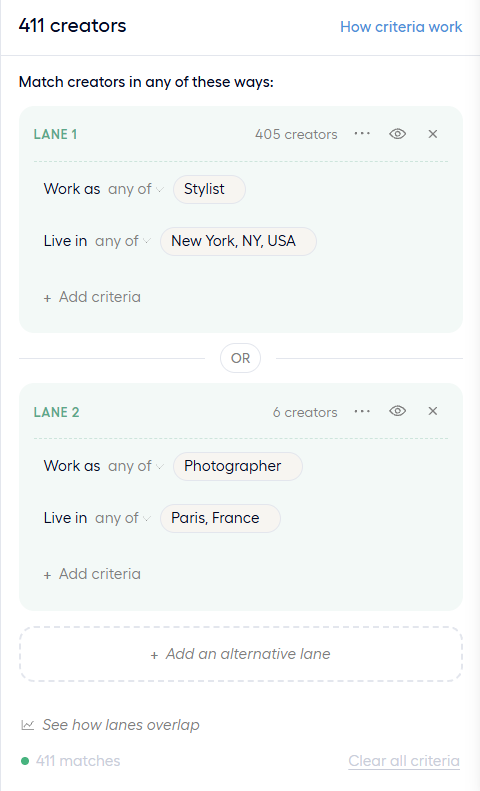
| Stylists in New York or photographers in Paris | Two lanes. Lane 1 has Profession set to Stylist and Location set to New York. Lane 2 has Profession set to Photographer and Location set to Paris. | Creators who match either lane. |
| Creators who never worked with a brand | One lane with Past work set to None of the selected brand. | Creators who have not worked with that brand. |
The following image shows a pool with alternative lanes. Each lane has its own criteriaOne condition a creator has to meet, such as Location or Profession., and an OR separates them.
Shortlist and Exclude
Shortlisting and excludingA creator you exclude stays out of the pool, even when they match every criterion. creators override the matching criteriaOne condition a creator has to meet, such as Location or Profession.:
- Shortlisted creators stay in the pool even if they no longer match the criteriaOne condition a creator has to meet, such as Location or Profession..
- Excluded creators stay out of the pool, even if they match every criterionOne condition a creator has to meet, such as Location or Profession..
You can apply these actions regardless of the criteriaOne condition a creator has to meet, such as Location or Profession.. See Shortlist and Exclude Creators.
Why pool results change
Pools are dynamic. Every time someone opens a pool, Fohr checks the criteriaOne condition a creator has to meet, such as Location or Profession. against the creators’ latest available data. As that data changes, creators can enter or leave the pool.
The following examples show what can change a creator’s eligibility.
| Criterion | What can change |
|---|---|
| Age Range, in Creator Demographics | A creator who turns 51 no longer matches a pool set to ages 40–50. |
| PREDICTED VIEWSFohr's forecast of the views a creator's posts will get., in Performance | New posts can change a creator’s predicted viewsFohr's forecast of the views a creator's posts will get. and move them into or out of your selected range. |
| Keywords, set to Posts | Fohr checks recent posts within a limited time window. A creator stops matching when the keyword no longer appears within that window. |
| Recently Logged InA badge for creators who logged in recently. Fohr calculates it by day., in BadgesA signal Fohr assigns to a creator, based on their activity or the views their content gets. | A creator who has not logged in recently loses the badgeA signal Fohr assigns to a creator, based on their activity or the views their content gets.. Because of the refresh delay, this change can take about nine days to appear. |
To keep a creator in your pool regardless of changes to their data, add them to your shortlist. See Shortlist and Exclude Creators.
Where to start
Start with the task you need:
Build a Pool
Create a pool, add criteriaOne condition a creator has to meet, such as Location or Profession., and choose how each criterionOne condition a creator has to meet, such as Location or Profession. matches.
Pool Criteria
Every criterionOne condition a creator has to meet, such as Location or Profession. you can add to a pool, with the options each one offers.
Expand a Pool with Lanes
Add, compare, and hide lanes to widen a pool without losing the first definition.
Read a Pool's Results
Read the cards, the match popoverThe small box that opens when you hover over the funnel icon. It shows why a creator matches., the creator panel, and the demographics, and choose how the pool shows results.
Shortlist and Exclude Creators
Shortlist and excludeA creator you exclude stays out of the pool, even when they match every criterion. creators, undo either one, and act on several at once.
Send Creators from a Pool
Open creators in Creator Review, add them to a campaign, bulletinAn open opportunity a brand posts for creators to apply to., or group, or export them.