

Content Criteria
Content criteria help you find creators based on what they post and how their content looks. All of them are available in the Content group of the Add criteria menu.
Fohr uses AI to assign DNA typeA label Fohr assigns with AI to show how a creator presents themselves and engages with their audience., Core topicsThe topics Fohr assigns to a creator's profile with AI. Fohr does not rank them., and Visual styleThe overall look and feel of a creator's content. Fohr assigns it with AI from their images and captions. based on creators’ posts and images. Keep the following limitations in mind:
- Creators without a profile do not match these criteria unless you select None of.
- Fohr does not refresh profiles on a fixed schedule, so the data may not include a creator’s most recent posts.
DNA type
Use DNA type to find creators based on how they present themselves and engage with their audience.
DNA type describes a creator’s behavior and approach, while Profession describes their job. A creator can match a DNA type without matching a corresponding profession.
The types are organized into the groups Authority, Angle, and Mode.
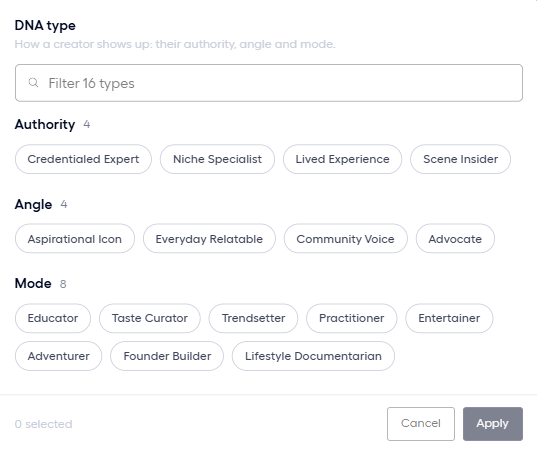
How selected types combine
The matching rules depend on whether your selections belong to the same group or different groups:
- Within the same group: Selections work as alternatives (ORAt least one condition has to match.). For example, selecting Educator or Trendsetter matches creators with either type.
- Across different groups: Selections work together (ANDEvery condition has to match.). For example, selecting Educator and Credentialed Expert requires a creator to have both types.
- All of: Requires creators to match every selected type. This rarely works for multiple types within the same group, because most creators have only one type per group. Some creators also have no Authority type.
Core topics
Use Core topics to find creators based on the topics assigned to their profiles.
Topics are not ranked, so a minor topic counts the same as a main topic.
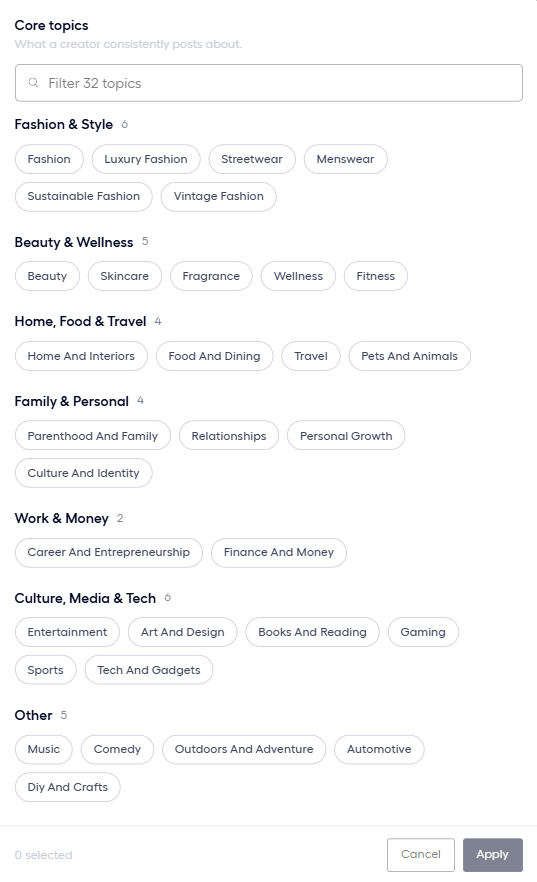
A creator matches when at least one selected topic appears on their profile. Select All of to require every selected topic.
Visual style
Use Visual style to find creators based on the overall look and feel of their content. Fohr evaluates both their images and captions.
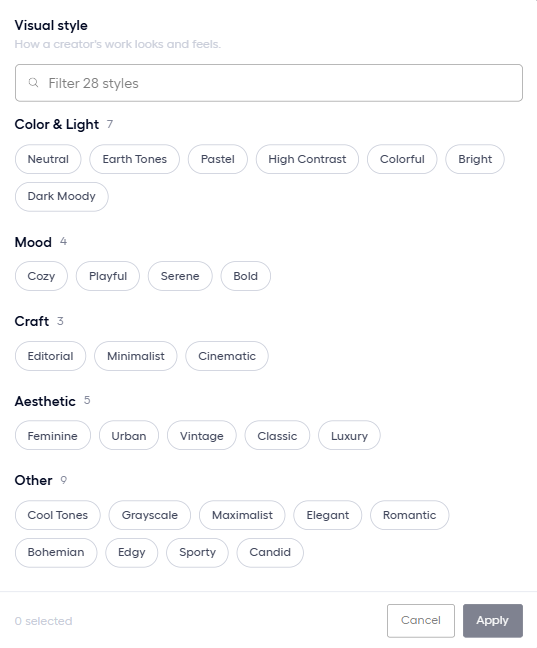
Visual styleThe overall look and feel of a creator's content. Fohr assigns it with AI from their images and captions. uses the same matching rules as Core topicsThe topics Fohr assigns to a creator's profile with AI. Fohr does not rank them.:
- By default, a creator matches when at least one selected style applies to them.
- All of requires every selected style to match.
Keywords
Use Keywords to find creators based on specific terms in their posts, bio, or name.
Each keyword criterion searches one location at a time. To search multiple locations, such as Posts and Bio, add Keywords as a separate criterion for each one.
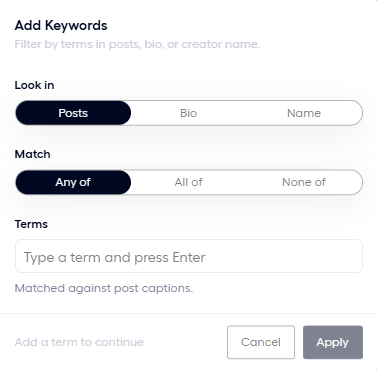
Set up a keyword criterion
The dialog has the following settings:
- Look in: Choose Posts, Bio, or Name. The description under the terms field explains what Fohr searches.
- Match: Choose Any of, All of, or None of to define how the terms must match. With All of, terms can match across different posts.
- Terms: Enter a term and press Enter to add it. You can add as many terms as needed.
Where Fohr searches and how terms match
Each Look in option searches a different source and uses different matching rules.
| Look in | What it searches | How it matches terms |
|---|---|---|
| Posts | Post captions, hashtagsA word or phrase after the # sign in a post, used to tag its topic., and tagged accountsAccounts that a creator tags in a post. from the last 12 months. Creator names are not included. | Captions match partial words, so skin also matches skincare. HashtagsA word or phrase after the # sign in a post, used to tag its topic. and tagged accountsAccounts that a creator tags in a post. require an exact whole-word match. |
| Bio | Instagram and TikTok bios, plus the Fohr tagline and description. | Every word in a term must appear as a whole word in the same bio. |
| Name | The creator’s name and handle. | Matches every word in the creator’s name or the exact handle. |
When a pool uses a keyword criterion, the creator’s side panel in the results displays matching posts first. See Read a Pool’s Results.
Related articles
Pool Criteria
The Add criteria menu and the groups of criteria.
Build a Pool
Create a pool, add criteria, and choose how each criterion matches.