

Creator Review
Your Fohr team builds a list of creators for a campaign and shares it with you here. Your job on this screen is to decide: approve the creators you want, pass on the ones you do not, and tell the team why. Decisions save as you make them, so you can work through a lineup over several sittings and stop whenever you like.
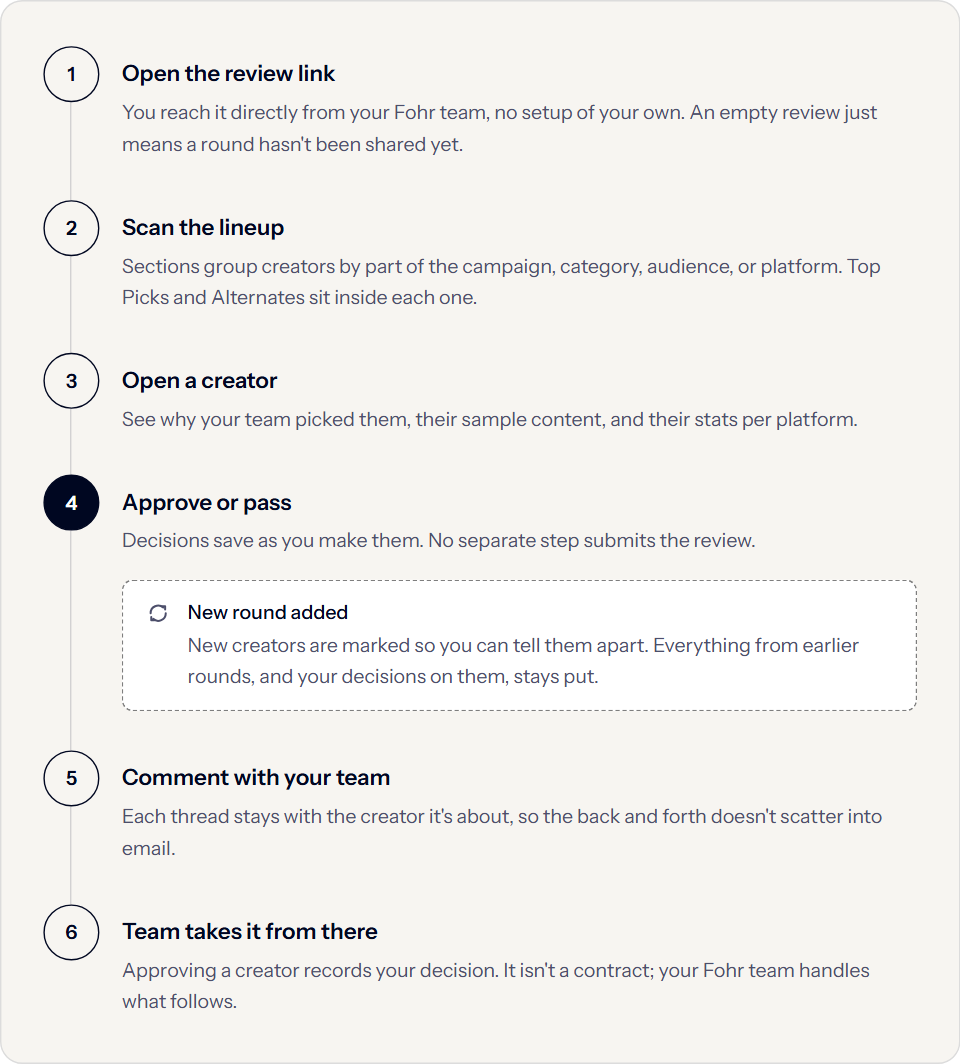
The following diagram shows the whole flow, from opening the review to your team taking over after you decide.
Before you start
Open the review from the link your Fohr team sends you. You reach the review directly, with no setup of your own.
If the review looks empty, your team has not shared the lineup yet. Creators appear only once the team publishes a round.
What you are looking at
Your team groups the lineup into sections, naming them after the parts of the campaign, a content category, an audience, or a platform. Comparing creators within a section is the point of the grouping.
Inside a section, creators sit in one of two lanes.
| Lane | What it means |
|---|---|
| Top Picks | The creators your team is proposing for the campaign. |
| Alternates | Backups your team is ready to bring in if you pass on a top pick. |
Your team chooses whether to show you the Alternates lane at all, so a review without one is a deliberate choice rather than something missing.
Selecting a creator opens their full details. The following table covers what you find there:
| Part | What it tells you |
|---|---|
| WHY THIS CREATOR | Your team’s case for this creator, written for this campaign. |
| SAMPLE CONTENT | Posts your team picked as the best evidence for that case, with one featured as the single most representative. |
| Statistics | Followers, engagement rate, and projected views, labeled per platform, so INSTAGRAM FOLLOWERS and TIKTOK FOLLOWERS are separate figures. |
| TAGS | Labels your team uses to group creators across sections. You can see and filter by tags, and your team maintains them. |
Projected figures are planning estimates based on past performance, not guarantees.
A creator showing a message like TikTok not connected has no connected account on that platform. That is a missing connection, not poor performance, and it is worth asking your team about rather than reading as a weak result.
Your team may add more creators later, as a new round. The review marks new creators so you can tell them from ones you have already seen, and everything from earlier rounds stays in the review along with the decisions you made. Nothing you have already decided needs redoing.
Approve or pass
Each creator carries an APPROVE and a PASS control. Decisions save as you make them, and no separate step submits the review, so you can leave and come back.
Your team may require a reason when you pass on a creator. Where your team requires one, you choose a suggested reason or write your own before the pass registers. Even where it is optional, a sentence about why saves a round trip, because it is what your team uses to choose the replacement.
Approving a creator records your decision. It does not put them under contract. Your Fohr team handles everything that follows.
Discuss a creator with your team
Select Open comments on a creator to start or read a thread. Comments are a conversation between you and your Fohr team. Each thread stays with the creator it is about, which keeps the back and forth out of email and next to the creator you are discussing.
Use a comment when you want an answer, for example asking whether a creator has worked with a competitor, or whether an alternate could replace a top pick.
Find what still needs a decision
Filters narrow the lineup to what you are working on, by section, by tag, and by status.
Hide Passed controls whether creators you have passed on stay on screen. Turning it off is how you revisit an earlier decision or explain one to your team. A creator disappearing right after you pass on them is hidden, not deleted.
Layout controls change how the review shows the lineup, between a grid, a list, and one creator at a time.
Troubleshooting
Two questions come up most often when you review a lineup, and both have a quick answer:
The review is empty #
Your team has not published a round yet. Creators appear only once your team shares the lineup, so this is a timing matter rather than an access problem. Ask your team when it will be ready.
A creator disappeared after you made a decision #
The default view hides passed creators, so a pass removes the creator from view at once. Turn Hide Passed off to bring them back.